Your context window is a budget. Stop spending it on PDFs.
A free Microsoft tool just made the AI marketing stack 70% more efficient. Here's how to wire it in.
Every conversation with an AI starts with a budget. You don’t see it, but it’s there. It’s called the context window — the amount of text the model can hold in its head before it starts forgetting the beginning of the conversation.
Most marketers spend this budget poorly. They drag PDFs into chat windows the way they’d email an attachment. The PDF gets parsed. The broken tables, the embedded image junk, the page numbers, the footnotes, the layout metadata — all of it gets converted into tokens.
A single twenty-page PDF can burn through 60,000 tokens before you’ve asked your first question.
That’s the problem Microsoft fixed. The tool has been sitting on GitHub for over a year with 120,000+ stars. Most marketers I talk to have never heard of it.
This piece walks through what MarkItDown is, every format it handles, how to wire it into Claude Desktop in five minutes, and where it wins versus where it loses. By the end, you’ll have an AI stack that runs at roughly 30% of the token cost — and a workflow where you stop thinking about file formats entirely.
KEY INSIGHTS
Every PDF page you upload to Claude raw consumes 1,500–3,000 tokens. The same content converted to markdown: about 200.
MarkItDown — MarkItDown is Microsoft’s free, open-source tool that converts PDFs, Word docs, Excel sheets, PowerPoint decks, YouTube transcripts, images, and audio into clean markdown for LLM consumption.
It ships with an MCP server — wire it into Claude Desktop once, and every file you drop into a chat gets auto-converted before Claude reads it.
Token usage drops by up to 70% on text-heavy documents. LLM answer quality goes up, because markdown is the format these models were trained on most heavily.
1. The token math marketers don’t run
A single page of a typical B2B PDF — a vendor report, an analyst deck, a research paper — consumes between 1,500 and 3,000 tokens when uploaded raw to Claude.
Why so much? Because PDF is a layout format, not a content format. Every text run, every embedded image, every table cell with merged rows, every footnote and header and page number carries metadata that has to be processed before the model can read the actual words.
Your twenty-page deck doesn’t cost you twenty pages of context. It costs you 40,000–60,000 tokens before you’ve asked your first question.
On the standard Claude plan, that’s almost a quarter of your context window. Burned. For free.
Convert the same deck to markdown — clean text with section headers, bullet points, and stripped formatting — and the cost drops to around 4,000–8,000 tokens. Same content. Roughly ten times more conversation room left over.
The marketers running real AI workflows already know this. The marketers still uploading PDFs raw are paying a tax they don’t see.
2. What MarkItDown actually is
THE TOOL
MarkItDown is a Python utility built and maintained by Microsoft. It does one job: it takes a file — almost any file — and converts the content to clean, structured markdown that LLMs read fluently.
120,000+ GitHub stars
Built and maintained by Microsoft
Free, open source, no API key required
Runs locally — your files never leave your machine
That last point matters for marketers handling client decks, partner contracts, internal strategy documents, and quarterly reports. Nothing goes to a cloud service. Everything stays on your laptop. The compliance posture is the same as opening the file in Word.
3. Every format it handles
This is where the tool gets interesting. MarkItDown isn’t a PDF converter. It’s a universal-input converter.
▸ PDFs — contracts, vendor reports, analyst documents
▸ Word docs — strategy briefs, meeting notes, edited drafts
▸ PowerPoint — vendor decks, internal presentations, board materials
▸ Excel — financial models, campaign metrics, contact lists
▸ HTML pages — articles you’ve saved, competitor websites
▸ Images (PNG, JPG) — screenshots with text are run through OCR
▸ Audio (MP3, WAV) — converted via Whisper, useful for meeting recordings
▸ YouTube URLs — pulls the transcript directly
▸ EPUBs — long-form books and white papers
▸ CSV / TSV — clean tabular data, ready for analysis
▸ ZIPs — recursively processes every supported file inside
If it has words in it, MarkItDown turns it into markdown. Every format goes through the same gate before Claude sees it.
4. The MCP integration — making the whole thing automatic
This is the part most tutorials skip, and the part that actually changes the workflow.
MarkItDown ships with an MCP server. MCP — Model Context Protocol — is the open standard Anthropic created for letting AI applications talk to external tools. When you wire the MarkItDown MCP into Claude Desktop, you stop having to convert files manually. Claude itself calls the conversion tool whenever you drop a file into chat.
The PDF goes in. Markdown comes out. Claude reads the markdown. You never see the intermediate step.
It’s the difference between manually exporting a Google Doc to markdown every time you want to use it versus having the conversion just happen, invisibly, every time.
5. The four-line config — do this once, save tokens forever
SETUP
The entire installation is four steps. Five minutes total.
Step 1. Install the MCP server.
pip install markitdown-mcpStep 2. Open Claude Desktop’s MCP config file.
On Mac — ~/Library/Application Support/Claude/claude_desktop_config.json
On Windows — %APPDATA%\Claude\claude_desktop_config.json
If the file doesn’t exist yet, create it.
Step 3. Add this block to the file.
{ "mcpServers": {
   "markitdown": {
     "command": "markitdown-mcp"
  }
 }
}
Step 4. Quit Claude Desktop completely and relaunch it.
You’re done. The next file you drop into Claude will be auto-converted to markdown before the conversation begins.
To confirm it’s wired correctly, drop in a small PDF and ask Claude to summarize it. If the tool calls something like convert_to_markdown in the response trace, you’re live.
6. When this wins (and when it doesn’t)
The tip is real. It is not universal.
▸ Wins on — text-heavy PDFs, research papers, contracts, vendor decks, books — anywhere the substance lives in the words.
▸ Loses on — PDFs where the meaning lives in the visuals — financial charts you need read line by line, architecture diagrams, image-heavy slides. Stripping these to markdown loses the signal.
▸ Mixed on — spreadsheets with merged cells, footnotes, or complex table layouts. Sometimes the markdown extraction mangles structure. Always sanity-check the first output.
The honest rule: if you’d describe the document to a colleague using words alone, MarkItDown helps. If you’d describe it by pointing at a chart, upload the PDF directly so Claude can see the page.
7. What changes in your workflow
After you wire this in, three things shift:
▸ You stop deleting old conversations to save context — The token budget grows so much that long, multi-turn conversations feel normal again.
▸ You start uploading bigger source material — The eighty-page analyst report you used to skim? You can feed the whole thing in. Same for the full quarterly transcript, the full ABM playbook PDF, the full competitive landscape report.
▸ Claude’s answers get sharper — Less formatting noise in the input means cleaner reasoning in the output.
None of these are individually dramatic. Together, they’re the difference between Claude as a chat tool and Claude as a working surface.
THE DIAGRAM
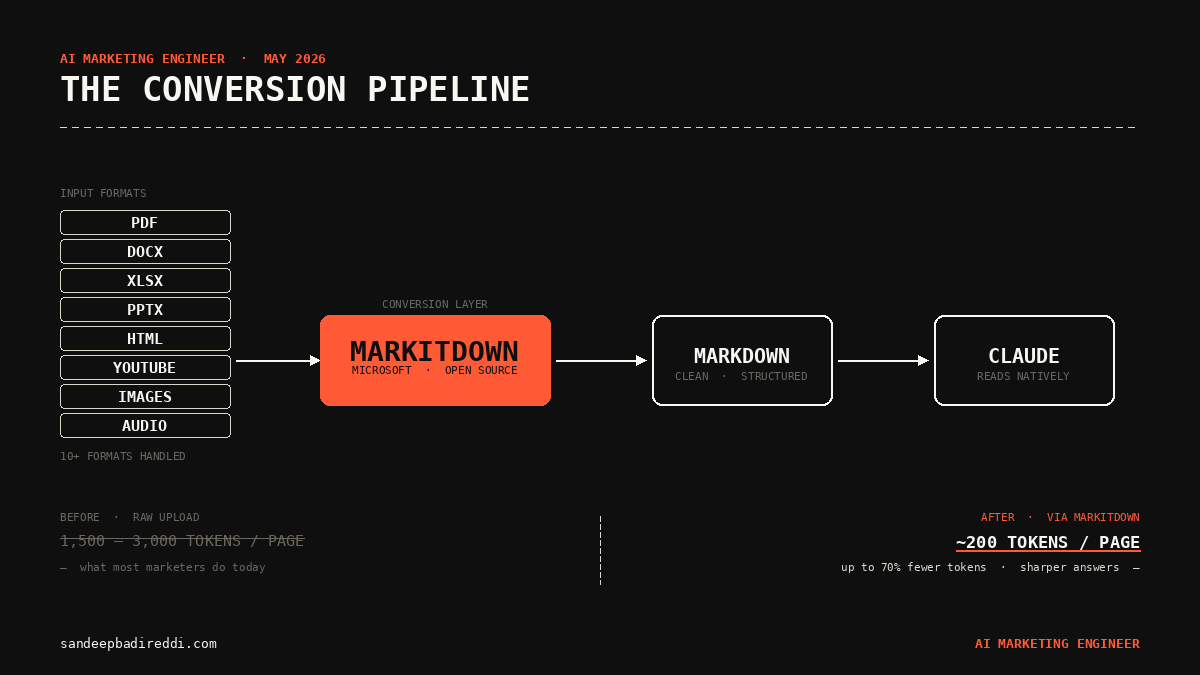
The middle layer is where most marketers leave money on the table. The coral box is what gets added when you wire in MarkItDown — the conversion gate that turns every input format into the one format LLMs actually read fluently.
What changes if you take this seriously
Your AI workflow stops being constrained by file format. Your context window starts behaving like the budget it actually is. Your conversations with Claude stop forgetting what you uploaded three messages ago.
The concrete next move: install MarkItDown tonight. Five minutes. The first time you drop a thirty-page PDF and watch Claude actually retain the entire thing through a long conversation, you’ll wonder why you ever uploaded raw files in the first place.
Next week we move from saving tokens to spending them right — the prompt patterns that turn this newly-available context into actual marketing leverage.
I write here as a marketer thinking about systems, not as a vendor selling tools.
If this was useful, share it with one person who’d argue with you about it.
If someone sent you this, subscribe — there’s more coming.
— The map I’m drawing.
Sandeep Badireddi · AI Marketing Engineer
15 years in B2B marketing. By day, Lead Digital Strategist at Cadence Design Systems. Outside of work, this page is a learning lab — exploring how the modern AI marketing stack actually works.
Newsletter → sandeepbadireddi.substack.com
Website → sandeepbadireddi.com
Views are my own.
First published on sandeepbadireddi.substack.com ↗
Get the next one.
One essay every Monday. Diagrams included.